We earn a commission if you buy through our links, at no extra cost to you.
Best Standing Desk for Dual Monitors: Size and Capacity
Choosing a standing desk for two monitors: width and depth, lift capacity, monitor arm clamps, cable trays and built-in power, with four models to compare.
At a glance
For two monitors, the Uplift V3 Bamboo offers widths from 42 to 80 inches and a built-in cable manager. The Secretlab Magnus Pro adds a power column and cable tray, though third-party arms may not fit. The Desky Dual Hardwood lists 330.7 lb capacity.

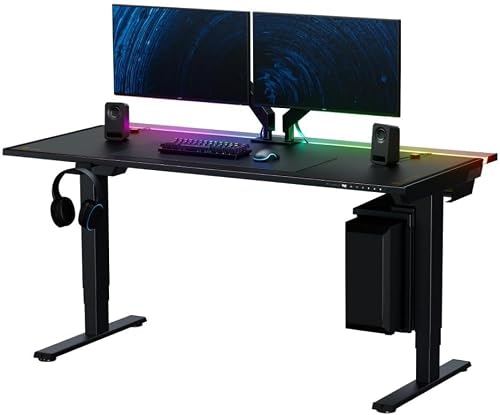

Two monitors change what you need from a standing desk. The top has to be wide and deep enough for both screens, the lift has to carry the weight of the screens, arms and cables, and the cables themselves have to survive the desk moving up and down. This guide covers those hardware points and compares four models from our lineup. The full ranking is in our comparison of the best standing desks. We do not run our own product trials. The facts below come from the brands’ own pages and from a named third party, Tom’s Guide, listed at the end. Where a brand leaves a number out, we say so.
This product is not a medical device and does not replace advice from a healthcare professional. Read the manufacturer's instructions before first use.
What to Check First
Width and Depth
Start with the monitors. Look up the exact width on each monitor’s spec sheet, add the two together, and leave room for a keyboard, bezels and stands. For ultrawide or larger panels, go wider. Depth matters too: a deeper top lets you push monitors further back. Uplift offers widths from 42 to 80 inches at 30 inches deep. The Progressive Desk listing here is 60 by 30 inches. The Secretlab Magnus Pro standard size is about 59 by 27.6 inches, and Secretlab also sells an XL.
Lift Capacity
Add up everything that sits on the desk: two monitors, two arms or stands, a laptop or tower, speakers and a desk mat. Then compare the total with the brand’s stated lift capacity. The brands list these figures: Desky 330.7 lb and Progressive Desk 270 lb. Tom’s Guide gives the Secretlab Magnus Pro a 265 lb max load and a 125 lb desk weight. Uplift does not list a capacity on the page we read, so confirm it with Uplift before you load the desk. Stay well under the limit and follow the manufacturer’s instructions.
Stability
A wide top with two monitors on arms puts load far from the legs. Brands describe their frames, but independent sway figures are rare. Tom’s Guide says the Secretlab Magnus Pro did not sway or rock at its maximum height of 49 inches when pushed. Uplift says its V3 frame needs no lower crossbar for stability. Those are descriptions, so judge the claims against your own setup and keep the desk on a level floor.
Monitor Arm Clamps
Most monitor arms clamp to the back edge of the desktop, which needs a flat edge of the right thickness. Check the arm’s clamp range against the top: Uplift lists a 1 inch bamboo top, and Vari lists a 1 1/4 inch top. Two trade-offs are worth knowing. Vari’s ComfortEdge slopes downward at the front, and owner comments on Vari’s page say hooks and mounts cannot go on the contoured edge, though clamp arms can still go on the sides or back. On the Magnus Pro, Tom’s Guide says third-party monitor arms may not work with the hinged cover of the cable tray, and Secretlab sells its own monitor arm that integrates with the desk. Whichever you choose, make sure you can return an arm that does not fit.
Cable Management
Two monitors mean at least two power cables and two video cables, plus a dock or laptop charger. Leave the cables enough slack that they do not pull when the desk rises. Uplift includes a FlexMount Cable Manager. The Magnus Pro has a full-length tray and magnetic accessories. Desky lists cable management as optional on this listing. Progressive Desk owners say the adhesive cable ties supplied do not hold well, so plan on buying your own clips or a tray.
Power
If you want fewer plugs on the floor, look at how each desk handles power. The Magnus Pro has an integrated power supply column, which Secretlab says runs the desk on a single concealed cable through the leg, and Tom’s Guide describes an AC outlet in the tray where you can plug in a power strip. The others need a wall outlet within reach of their cable length.
Desks to Compare
Uplift V3 Bamboo: Widest Choice of Sizes
Widths from 42 to 80 inches at 30 inches deep, a 1 inch bamboo top, a FlexMount Cable Manager and a 15-year warranty, per Uplift.
Uplift says the V3 frame has a 22.6 to 48.7 inch height range, needs no lower crossbar and goes together with one tool. The warranty covers every desk in full plus most accessories. The page we read does not list a lift capacity or the number of presets, so confirm both with Uplift. The listing we link is one configuration of the desk, so check the width before you order. See the Uplift V3 Bamboo profile.
Secretlab Magnus Pro: Tidiest Power and Cables
A full-length cable tray, an integrated power supply column with a built-in socket and 3 presets on a backlit panel. Check your monitor arm before buying.
Secretlab lists a 650 to 1250 mm range (about 25.6 to 49.2 inches) and a built-in control panel with three custom height presets. The listing describes a MAGPAD leatherette desk mat. Tom’s Guide gives it a 265 lb max load and says the desk did not sway at 49 inches. The trade-off is the one above: third-party arms may not work with the hinged tray cover. The standard size is about 59 by 27.6 inches, and we found no warranty term on the page we read. See the Secretlab Magnus Pro profile.
Desky Dual Hardwood: Highest Stated Capacity
A 330.7 lb capacity, dual motors and a solid hardwood top, rated at about 40 dB in motion according to Desky.
Desky lists dual motors, 3-stage legs, a 23.6 to 49.2 inch range without the desktop and memory presets, though not their count on the page we read. The listing is the White Ash 60 inch top on a Space Gray frame, and cable management is optional. Desky lists AFRDI certification (Cert #17617/1), TÜV Rheinland and a 10-year warranty. One customer comment on Desky’s page says the desk lifted a 49-inch monitor, a NAS and speakers. That is an owner’s account, not our finding. See the Desky Dual Hardwood profile.
Progressive Desk Solo Ryzer: Dual-Motor Option

A 60 by 30 inch top, dual motors, 270 lb capacity, 4 memory positions and a 15-year warranty.
Progressive Desk lists a 23.6 to 49.1 inch range, 3 stages, collision detection and a child lock. The maker page we read is for the MDF version of the Solo Ryzer, and the listing we link is the 60 by 30 inch Light Ash top on a black frame. Owner comments on the page criticize the adhesive cable ties and mention obstacle detection and grommet fit, and Progressive Desk replies that it will pass that feedback to its team. See the Progressive Desk Solo Ryzer profile.
Quick Comparison
| Desk | Top size | Capacity | Cables and power | Warranty |
|---|---|---|---|---|
| Uplift V3 Bamboo | 42 to 80 x 30 in. | Not listed | FlexMount Cable Manager | 15 years |
| Secretlab Magnus Pro | About 59 x 27.6 in. | 265 lb max load (Tom’s Guide) | Full-length tray, power column | Not stated |
| Desky Dual Hardwood | 60 in. wide | 330.7 lb | Optional management | 10 years |
| Progressive Desk Solo Ryzer | 60 x 30 in. | 270 lb | Adhesive ties supplied | 15 years |
Before You Order
Measure both monitors and add up the weight of everything on the desk. Check your arm’s clamp range against the top and edge. Confirm that the listing names the size and finish you want, and compare it with the brand’s page. To see all of our picks together, go to our standing desk comparison.
Sources
- UPLIFT V3 Bamboo Standing Desk page
- Secretlab MAGNUS Pro official product page
- Tom’s Guide: Secretlab Magnus Pro standing desk
- Desky Dual Hardwood Stand Up Desk official product page
- Progressive Desk Solo Ryzer MDF Sit-Stand Desk official product page
- Vari Electric Standing Desk with ComfortEdge 60x30 official product page
Frequently asked questions
How wide should a standing desk be for two monitors?
Add the widths of both monitors and leave room for a keyboard and mouse. Take each monitor's width from its spec sheet, since bezels and stands vary. Uplift offers widths up to 80 inches, and the Progressive Desk listing here is 60 inches wide.
How much lift capacity do I need for two monitors?
Add up the monitors, the arms, a laptop and anything else on the desk, then stay under the brand's limit. Desky lists 330.7 lb, Progressive Desk 270 lb and Secretlab's max load is 265 lb per Tom's Guide. Uplift does not list a capacity on the page we read.
Will a clamp-style monitor arm work on a standing desk?
Usually yes, if the desktop edge is flat and the thickness is within the arm's clamp range. Per owner comments on Vari's page, hooks and mounts cannot go on Vari's sloped front edge. On the Secretlab Magnus Pro, Tom's Guide says third-party arms may not work with the cable tray's hinged cover.
Does a standing desk need a lower crossbar for stability?
Not always. Uplift says its V3 frame does not need one. Stability still depends on the load and the floor, so keep the desk level and follow the manufacturer's instructions.
How do I keep cables from stretching when the desk moves?
Leave slack in every cable and use a tray or cable manager that moves with the desk. Uplift includes a FlexMount Cable Manager and the Magnus Pro has a full-length tray. Progressive Desk owners say the adhesive cable ties on that desk do not hold well.
Can the desk power my monitors directly?
The Secretlab Magnus Pro has an integrated power supply column and an AC outlet in its cable tray, per Tom's Guide, where you can plug in a power strip. For the other desks, plug the power strip into a wall outlet.