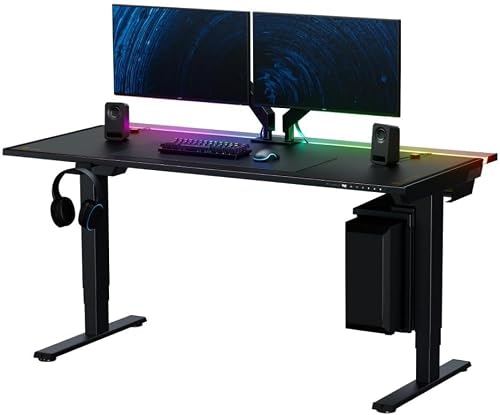
The Secretlab Magnus Pro is an electric standing desk built around cable management. Secretlab lists a 650 to 1250 mm height range (about 25.6 to 49.2 inches), a built-in control panel with three presets, a full-length cable tray, an integrated power supply column and magnetic accessories. This profile covers what Secretlab and Tom’s Guide publish, who the desk suits and where it falls short. For a more traditional alternative, see the Vari ComfortEdge 60x30 profile. To see how it stacks up against the other desks we cover, read our ranking of the best standing desks.
This product is not a medical device and does not replace advice from a healthcare professional. Read the manufacturer's instructions before first use.
We do not run our own product trials. The specs below come from Secretlab’s product page, and the figures attributed to Tom’s Guide come from its Magnus Pro write-up, both read on November 26, 2026. The Secretlab page we read was a regional store page for the same product, so verify details against the current US page.
The Short Version
Secretlab pitches the Magnus Pro as its flagship sit-stand desk, with a full metal build and a magnetic accessory system. The standout idea is that cables disappear: one cable into the leg, a full-length tray under the top and a control panel built into the surface.
The trade-offs are size, limited size and color options, and a product page that leaves some specs out. In the version we read, Secretlab’s page gives no lift capacity, motor count or warranty terms. Tom’s Guide fills in some of the gaps, and we attribute those figures to it.
Key Specs According to Secretlab
- Height range: 650 mm to 1250 mm, which is about 25.6 to 49.2 inches.
- Presets: three custom height presets on a built-in control panel.
- Desktop: a full metal desk. The standard size is about 59 x 27.6 inches, and an XL size also exists.
- Cable management: a full-length tray that hides an extension strip and cables, with access from the top through a rear hinged cover.
- Power: an integrated power supply column that Secretlab says powers the desk and your devices through a single cable. Tom’s Guide describes an AC outlet in the tray.
- Accessories: a suite of modular, magnetic accessories. This listing comes with a Stealth leatherette MAGPAD desk mat.
- Capacity: not listed on the page we read.
- Motors: not listed on the page we read.
- Warranty: Secretlab mentions warranty coverage, but the page we read gives no terms.
What Tom’s Guide Says
Tom’s Guide describes the Magnus Pro as a dual-motor desk with a steel frame and a magnetic attachment system. It lists a 265 lb maximum load, a 125 lb desk weight and a 25.6 to 49.2 inch height range. The writer says the desk did not sway or rock when pushed at its maximum height. Those are Tom’s Guide’s statements, not ours.
The write-up also says the desktop combines MDF and a high-pressure laminate bamboo layer, wrapped in steel, which is what makes the magnetic system work. It notes that the desk comes only in black, that size options are limited and that Secretlab’s accessories are sold separately. The writer also says four presets would have been nicer than three, and that anyone short on space might look elsewhere.
What Sets It Apart
Cable handling is the reason this desk exists. On many standing desks the cables trail between a power strip and the desktop and move as the desk rises. Secretlab’s integrated power supply column feeds the desk through a single concealed cable in the leg. Tom’s Guide says that means the power cord stays still while the desk moves. The tray under the top hides the extension strip, and its cover opens from above.
The second point is the control panel. Secretlab says it is seamless and built into the desktop, with three custom presets, so there is no separate keypad to mount.
The third is the magnetic system. Secretlab says accessories such as the MAGPAD desk mat, cable anchors and a monitor arm attach magnetically. These parts are optional, and they are the main way to expand the setup, so expect to buy them from Secretlab.
Design and Setup
At about 59 x 27.6 inches, the standard top is large. Tom’s Guide says anyone short on space might look elsewhere and recommends the Branch Duo, available in a 36 x 24 inch size, for tight spaces. If you are furnishing a small apartment, this is probably the wrong desk.
Tom’s Guide says the desk weighs 125 lb, yet felt light enough to pull out or move around the house. That is a single writer’s account. Tom’s Guide also calls assembly simple. Secretlab’s page lists a what’s-in-the-box section and resources. Plan for two people to lift and place the desk.
Secretlab’s page mentions a United States certification but gives no standard name or certificate number on the page we read. Do not rely on it until Secretlab provides details.
Capacity and Stability
Secretlab does not publish a capacity on the page we read, so we use Tom’s Guide’s 265 lb maximum load, with the caveat that it is a third-party figure. Check with Secretlab before you load it with heavy gear. The 125 lb desk weight is useful context, since a heavy desk tends to resist movement.
Tom’s Guide’s no-sway comment at the 49 inch maximum is the main stability note available. We have not verified it, and a different size, such as the XL, may behave differently.
Compatibility With Third-Party Gear
The magnetic accessories are a strength and a lock-in risk. Tom’s Guide notes that third-party monitor arms and other accessories can be used but may not work with the tray’s hinged cover. If you already own arms or power gear, check that they fit before you commit.
Who Should Buy It
This desk suits buyers who care about a clean look and tidy cables and have the room. Tom’s Guide says it may be marketed at gamers but suits anyone who wants a clean desk setup. It fits a large home office, a gaming setup or a creative workspace where the surface is on display. The magnetic mat and accessories also suit people who like to rearrange their setup.
Who Should Skip It
Skip it if you live in a small space, because even the standard size is large. Skip it if you want many size or color choices, because Tom’s Guide says it comes only in black and in limited sizes. Skip it if you need published warranty terms and a listed capacity from the brand before ordering. If you want a hardwood top, look at the Desky Dual Hardwood instead.
Pros and Cons
Pros
- Full-length cable tray and an integrated power supply column
- Built-in control panel with three presets
- 650 to 1250 mm range, about 25.6 to 49.2 inches
- Magnetic accessory system and MAGPAD desk mat
- Tom’s Guide says no sway at the 49 inch maximum, with a 265 lb max load
Cons
- Large footprint, with limited size options
- Tom’s Guide says it comes only in black
- Capacity, motor count and warranty terms are not on the page we read
- Only three presets
- Accessories are sold separately and may not suit third-party gear
What to Check Before You Buy
- Listing: confirm it says Magnus Pro and shows the size and mat you want.
- Space: measure for about 59 x 27.6 inches, or XL if you choose it.
- Height: compare the desk heights you need with 25.6 to 49.2 inches.
- Warranty: ask Secretlab for the terms and the capacity in writing.
- Accessories: check that your monitor arm and power gear fit the tray and mat.
- Help: line up a second person to lift and place the desk.
See the current options here: Secretlab Magnus Pro on Amazon. Buying through our link may earn a commission at no cost to you.
Sources